/

On this page
Git Workflows
A Git workflow encourages effective collaboration, makes software development process more efficient, and facilitates continuous delivery. By choosing a singular Git workflow, teams can pave the way for smoother conflict resolution and a more coherent code base.
Centralized
A centralized Git workflow enables all team members to make changes directly to the main branch, with every change logged in a running history. This works well for small teams (or beginners), because team members can communicate easily in order to avoid contributing to the same piece of code simultaneously.
Limitations: If multiple developers commit to the same branch, it’s challenging to find a stable moment to release changes. Consequently, developers must keep unstable changes local until they’re ready for release.
Feature Branching
Rather than commit directly to the main branch, developers create a branch for each feature, make changes, submit a merge request (or pull request), and then merge it into main. This has the benefit of keeping a clean main branch without unfinished features.
Teams of any size can use this feature branching, because it permits multiple developers to work on the same feature simultaneously.
GitFlow
This workflow doesn’t add any new concepts beyond the Feature Branch Workflow, while it assigns specific roles to different branches and defines how and when they should interact. Here you would use a develop branch with feature branches.

The main branch should always be releasable to production, and there should never be untested / incomplete code on it. When the develop branch is ready to go to production, a contributor creates a release branch where testing and bug fixing occur before being merged back to the develop branch.
The release branch makes the code review process easier, because there’s a dedicated place to resolve conflicts when merging into the main branch. With this strategy, the main branch always reflects production.
Trunk-Based Development
Trunk-based development facilitates concurrent development on a single branch called trunk. Developers work directly on trunk or on short-lived branches, and when they are ready to release, they use release branches.
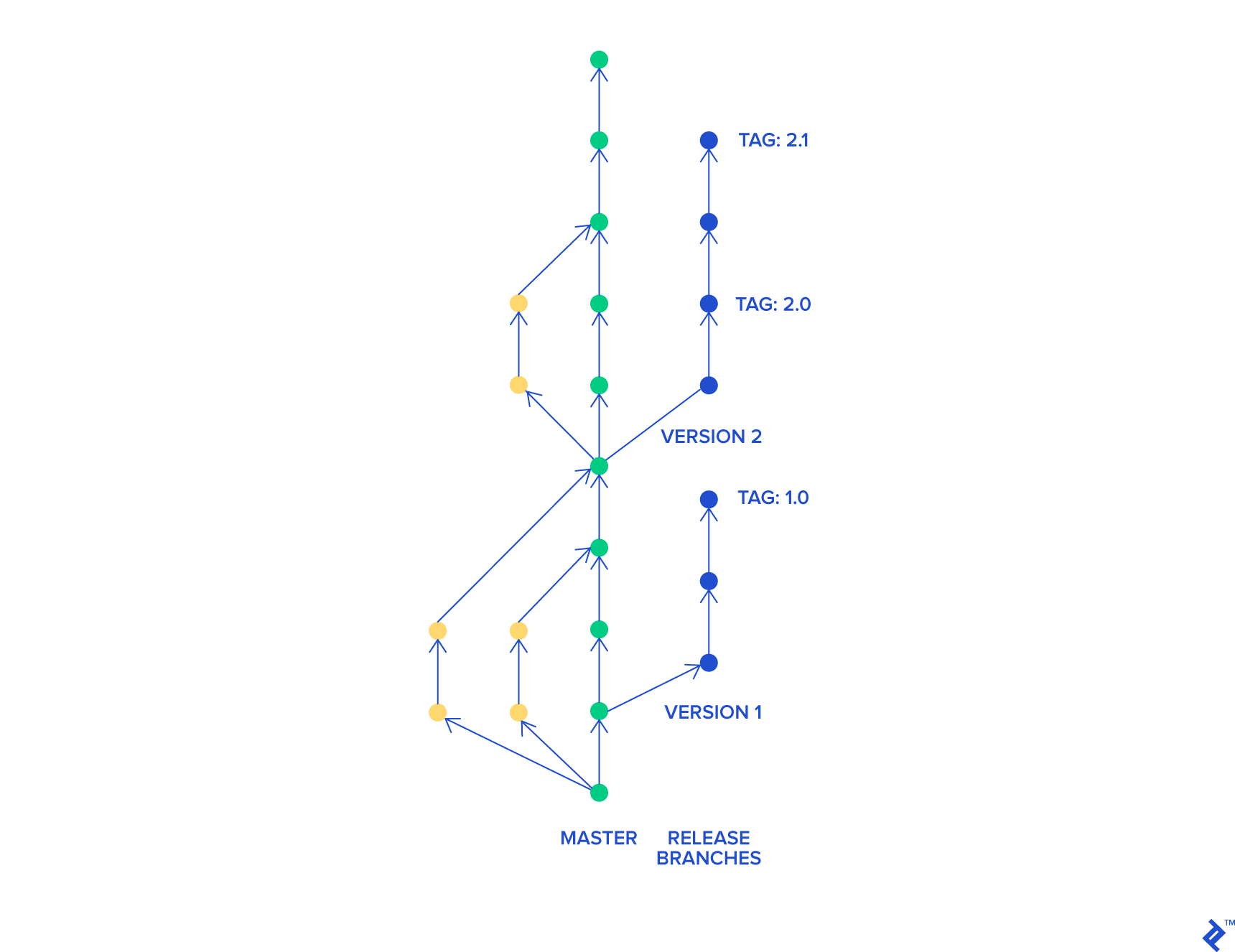
Trunk-based development decreases the likelihood of merge conflicts and keeps code clean, because there are many frequent, small merges made each day.
Personal Branching
Personal branching is similar to feature branching, but rather than have a single branch per feature, it’s per developer. This approach works well if team members work on different features and bugs.
Every user can merge back to the main branch whenever their work is done.
Advantages:
- Similar benefits as feature branching
- Fewer branches, so branch management is easier
- Can be used for bug fixes and small changes
- Help developers innovate and experiment
- Useful for long-running features that may not fit into a single release cycle
This strategy can work well for small teams in which every team member develops their own part of the application.
Forking
A forking approach to version control starts with a complete copy of the repository. Forking effectively creates a local copy of a Git repository and provides the ability to create a new collaboration structure.
This workflow is popular for projects that have multiple developers contributing to it, particularly open source projects. After all, keeping track and providing privileges to collaborate to a repository with thousands of contributors is difficult to maintain.
If a maintainer enables contributors to try their changes on their forked copy, managing change proposals is easier and safer.
Benefits:
- Contributors can push changes to a server-side repository
- Decreases likelihood of including low-quality code and bugs
- Only project maintainers can integrate changes to the source code
- Enables secure, quality-driven development for large teams
Images sources: Toptal – Trunk Based Development vs Git Flow