/
 0.2.0
0.2.0
On this page
Distributed Systems
Distributed systems generally consist of multiple interconnected devices or computers that work together to perform a task that is beyond the capacity of a single system. These systems work by collaborating, sharing resources and coordinating processes to handle complex workloads.

Types of Distributed Systems
Client-Server Architecture
The most traditional and simple type of distributed system, involving a multitude of networked computers that interact with a central server for data storage, data processing, or other common goal.
Multi-Tier Architecture
Builds on client-server by further dividing server roles, isolating data processing and management tasks to separate nodes for efficiency and scalability.
Peer-to-Peer Architecture
Distributes workloads among hundreds or thousands of computers all running the same software. Every node has the full application stack, offering high redundancy. Nodes synchronize with each other, ensuring system persistence even if some nodes fail.
Key Characteristics
Scalability
The ability to grow as the size of the workload increases is an essential feature of distributed systems, accomplished by adding additional processing units or nodes to the network as needed.
Concurrency
Distributed system components run simultaneously. They’re also characterized by the lack of a “global clock,” when tasks occur out of sequence and at different rates.
Availability and Fault Tolerance
If one node fails, the remaining nodes can continue to operate without disrupting the overall computation.
Heterogeneity
In most distributed systems, the nodes and components are often asynchronous, with different hardware, middleware, software and operating systems. This allows the distributed systems to be extended with the addition of new components.
Replication
Distributed systems enable shared information and messaging, ensuring consistency between redundant resources, such as software or hardware components, thus improving fault tolerance, reliability, and accessibility.
Transparency
The end user sees a distributed system as a single computational unit (a single app) rather than as its underlying parts, allowing users to interact with a single logical device rather than being concerned with the system’s architecture.
Scalability
Scalability refers to the ability to grow or expand something efficiently while maintaining the performance. It’s not just about “getting bigger”, it’s about doing so in a way that aligns with your goals ensuring a seamless experience for everyone involved.

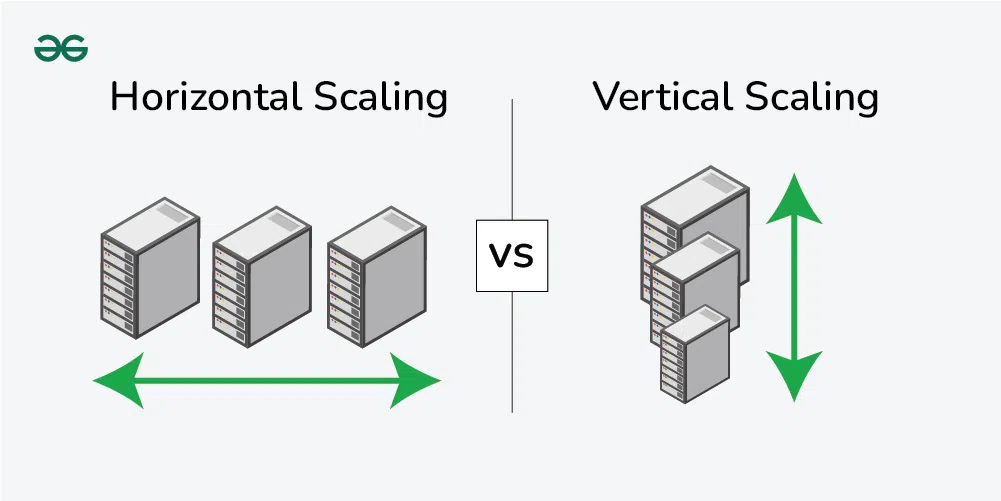
Vertical Scaling (Scaling Up)
Adding more power (CPU, RAM, Storage) to your existing servers. While this can be a quick solution to handle a growing workload, it is limited to certain extent of the server. It can’t go beyond at certain limit.
Examples:
- Upgrading a database server from 16 GB RAM to 64 GB RAM
- Moving from a single-core processor to a multi-core processor
Pros and Cons:
- ✅ Simple to implement without much changes required in the system architecture
- ❌ Limited by hardware constraint and single point of failure
- ❌ Can be expensive and may require downtime for upgrades
Horizontal Scaling (Scaling Out)
Adding more instances or nodes to your system and distributing the load on multiple nodes. This allows organizations to handle increased demand efficiently, ensure high availability, and minimize the risk of bottlenecks.
Examples:
- Adding more servers to a web server cluster to handle additional requests
- Sharding a database to distribute data across multiple machines
Pros and Cons:
- ✅ Virtually unlimited scalability
- ✅ High availability and fault tolerance
- ✅ More cost-effective and elastic
- ❌ Requires changes in the architecture (load balancing, maintaining sync nodes)
Diagonal Scaling
A hybrid approach that combines vertical and horizontal scaling. Start by scaling vertically to a threshold, then scale horizontally as needed.
Database Scaling
When an application increases its user base, the database can struggle to handle the increasing load, resulting in slower response times, longer query execution, and eventual system crashes.
Sharding
Database partitioning technique where data is split into smaller, more manageable chunks (called shards) and stored across multiple servers. Each shard holds a subset of the data, and together, they make up the complete dataset (e.g., one could shard user data based on their geographical region).
Benefits:
- Fault isolation: if one shard goes down, only a portion of the data and requests is affected
- Optimized query performance: shards operate on reduced datasets
- Horizontal scalability
Challenges:
- More complexity: querying across multiple shards, managing shard key selection
- Data skew: if shards are not evenly distributed, some servers might be overloaded
Replication
Involves copying data from one database (called the primary) to one or more databases (called replicas). The replicas act as backups and can also be used to distribute read traffic.
Typical Setup: Master-slave (or primary-replica) replication
- Primary database: handles all write operations
- Replica databases: handle read operations, reducing the load on the primary database
Benefits:
- High availability: replicas can be promoted to primary db if needed
- Fault tolerance: replication provides real-time backups
- Load distribution
Challenges:
- Handling failover and avoiding split-brain scenarios
- Replication lag: slight delay between writing data to primary and propagating to replicas
Caching
Involves storing frequently accessed data in a faster, temporary storage layer (typically in-memory) to reduce the load on the database and improve response times.
Example: Using Redis for caching
Benefits:
- Improved latency: significantly reduced query response times
- Reduced load on the database
- Cost efficiency: reduces need for additional database instances
Challenges:
- Cache invalidation: ensuring the cache is always up-to-date
- Cache misses: when data is not in the cache, application still needs to query the database
Load Balancing
The process of distributing incoming network traffic across a set of resources, ensuring the performance and reliability of the system. This provides the flexibility to add or subtract resources as demand dictates.

Problems Solved by Load Balancing
- Single Point of Failure: If the server goes down, the whole application would be interrupted
- Overloaded Servers: Limitation on the number of requests that a web server can handle
- Limited Scalability: Without a load balancer, adding more servers to share the traffic is complicated
How Load Balancers Work
A load balancer sits in front of the servers and directs client requests across all servers capable of serving them, optimizing speed and capacity use. This prevents one server from getting too busy and slowing down. If a server goes down, the load balancer redirects traffic to the remaining online servers. When we add a new server, the load balancer automatically starts sending requests to it.
Load Balancing Algorithms
Static Algorithms
Predetermined assignment of tasks or resources without considering real-time variations:
- Round Robin: Distributes requests sequentially across servers
- Weighted Round-Robin: Assigns weights to servers based on capacity
- Source IP Hash: Directs requests from the same client to the same server
Dynamic Algorithms
Make judgments in real time, adapting to the system’s shifting circumstances:
- Least Connection Method: Directs traffic to the server with the fewest active connections
- Least Response Time Method: Chooses the server with the fastest response time